
Meta Ads are one of the most effective ways for businesses to connect with people online. With billions of active users on Facebook, Instagram, Messenger, and the Audience Network, Meta helps brands reach people throughout their customer journey. Whether you’re looking to increase awareness, generate leads or sales, or drive app installs, Facebook Ads can help with nearly any objective.
This walkthrough will explain what Meta Ads are, how they work, the forms of ads you can purchase and where to deploy them and why it’s important for businesses both large and small. There are a lot of new Meta ad buyers or expanding campaigns in 2026, this straightforward breakdown will get you up to speed on everything you need to know.
What Are Meta Ads? A Simple Introduction for Beginners
Meta Ads are ads purchased that run on Meta’s family of apps and on partner websites. These ads can be served to people on Facebook and Instagram, as well as on Messenger, Marketplace, Reels, and the Audience Network of thousands of other apps.
They help companies surface their message to the people they want to reach based on interests, behavior, demographics, and past interactions with your brand.
In simple terms: Meta ads services can get your messages in front of people where they’re spending time, and you only pay when people take the action you want.
What Is Meta Ads and How Does the Meta Ads Platform Function?
Meta Ads run on a powerful advertising platform and are delivered to people based on what you care about most, so you can tell your story to the people who matter most to your business.
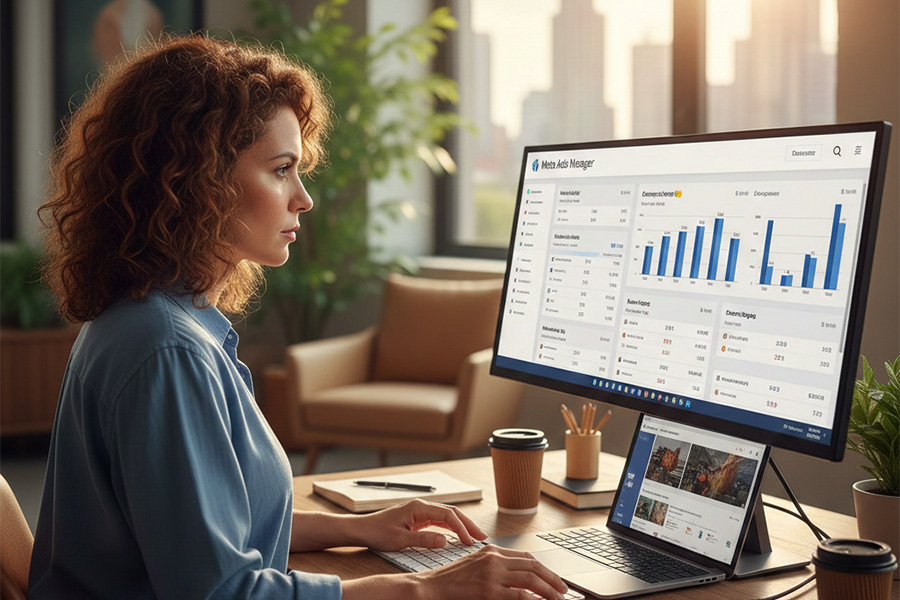
Here is the basic workflow:
- You select a goal: traffic, leads, sales, or awareness.
- You define who you connect with according to location, interests, age, behavior, or user-defined data.
- You determine the placements, budget, and schedule.
- You build the creative using images, videos, and text with a call-to-action button.
- Meta’s system places the ad in front of the right people at the appropriate time.
- You measure results using a dashboard and optimize for performance.
Machine learning enhances your results by learning from user behavior, conversion data, and your prior campaigns.
Why Meta Is Important for Facebook, Instagram, and Audience Network Ads
Meta Ads matter because they connect with people in spaces where they are at ease scrolling, discovering new content, and products. Unlike search ads, where people already know what they want, Meta helps you connect with people earlier in their path.
This helps with:
• Brand awareness
• Product discovery
• Remarketing to site visitors
• Building long-term interest
• Converting users from interest to action
Instagram ads services is particularly powerful for visual brands (fashion, beauty, and lifestyle) or anything with strong creative. Services and local, more general audiences perform well on Facebook. Audience Network reaches people across other apps and mobile sites beyond Meta’s own.
Combined, they form one of the world’s biggest advertising ecosystems.
Why Meta Ads Are Beneficial to Businesses of All Sizes
Businesses advertise with Meta Ads because the platform offers laser-focused targeting, a wide range of budget options, and detailed reporting. Some of the key benefits are:
- You can reach almost any audience : teenagers, new mothers, business owners, travelers, or shoppers.
- You manage your budget: test small and scale only what works.
- You receive in-depth reporting: Meta shows clicks, impressions, conversions, sales, leads, and more.
- You may retarget warm audiences: people who visited your site or added to cart can be shown custom ads.
- You can run full-funnel campaigns: awareness, engagement, views, leads, and purchases all in one system.
- Creative freedom: images, videos, Reels, Stories, carousels, shopping posts, and branded content ads offer flexibility in storytelling.
Meta Ads enable small as well as big brands to grow at scale.
What Types of Meta Ads You Can Run on Facebook and Instagram
Meta has a variety of ad formats that suit various objectives and creative styles. You can select basic image ads, video ads, product carousels, dynamic catalog ads, lead forms, or app install ads.
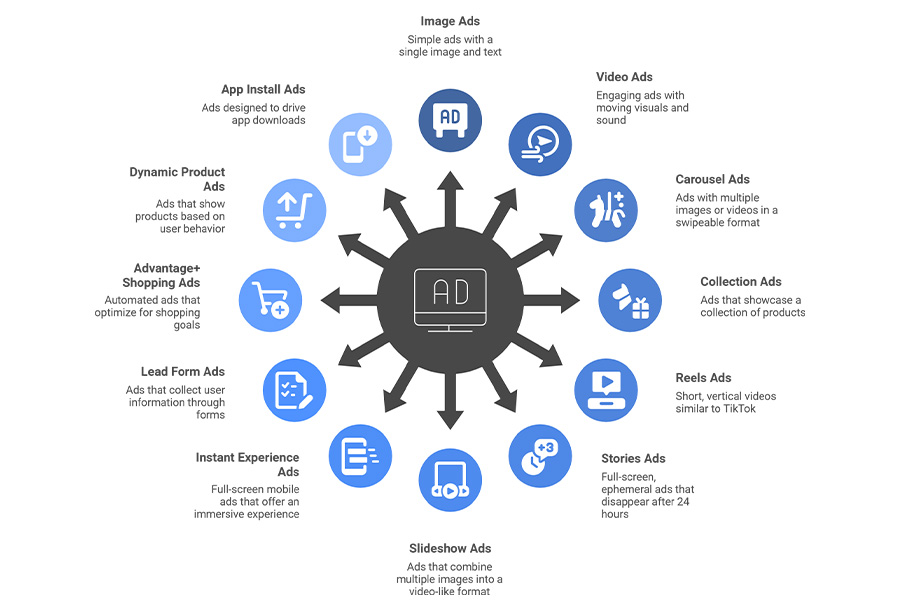
Here are the main types:
- Image ads
- Video ads
- Carousel ads
- Collection ads
- Reels ads
- Stories ads
- Slideshow ads
- Instant Experience (full-screen mobile ads)
- Lead form ads
- Advantage+ shopping ads
- Dynamic product ads
- App install ads
Each type has strengths. For instance, image ads are effective for short messages, while videos are great for telling longer stories. Dynamic ads are perfect for e-commerce because they show users the exact product they viewed.
Where Meta Ads Show Up: All Meta Ads Placements Explained
Placements dictate where your ads will show. Knowing placements allows you to match the right creative with the right placement.
Meta Ads Placements on Facebook
- Facebook Feed: Swipe to pull down news feed. Interactivity high; for most ads, performance strong.
- Facebook Marketplace: Best for product-based local ads and selling.
- Video Feed Facebook: Shows video ads to users as they watch their videos.
- Facebook In-Stream Videos: Short ads that appear before or in the middle of other videos.
- Facebook Right Column: Desktop-only placement. Works well for retargeting.
- Facebook Stories: These are full-screen, vertical ads that act in-between your friends’ stories.
- Facebook Reels: Good for short, vertical video ads.
Meta Ads Placements on Instagram
- Instagram Feed: It’s so visual and lends itself great for lifestyle brands.
- Instagram Explore: For those who are actively looking for new content.
- Instagram Stories: Full-screen, vertical and plenty of engagement.
- Instagram Reels: Great for short-form videos and showcasing products.
Audience Network (Apps and Publisher Websites) Placements
The Audience Network delivers ads to third-party mobile applications and websites. These placements serve to extend reach beyond Meta apps.
Common placements:
- In-app banners
- Interstitial ads
- Rewarded video ads
- Native ads on partner sites
Audience Network is also useful for scaling impressions and discovering users outside of Facebook and Instagram.
Automatic vs Manual Placements: Which Will Serve You Best?
Meta has two placement settings: automatic or manual.
Automatic placements allow Meta to place your ads in every available placement. This tends to give you better performance overall; Meta’s system can often put together the cheapest and most effective combinations.
Manual placements let you select the exact placement where your ad is shown. This is something some advertisers want when they have a certain creative format like vertical videos created only for Stories and Reels.
In most cases:
Automatic placements work better since they provide the system with more local optimizations.
But manual placements can be useful when you want to concentrate on a particular format, platform, or audience behavior.
How to Structure Meta Ads Campaigns (Campaigns, Ad Sets and Ads)
When you get your head around the three main layers, Meta’s layout is pretty simple.
- Campaigns : Here is where you select your primary goal, which could be traffic, leads, sales, awareness, or engagement.
- Ad Sets : This is where you choose:
• audience
• budget
• schedule
• placements
• optimization goal
Your ad set is the heart of your strategy. It determines who views your ads and how much you spend. - Ads : This is your creative. It includes:
• images
• videos
• primary text
• headline
• call to action
• links
Once people start to engage, you can test different creatives within one ad set too.
Knowing this structure enables you to keep your campaigns neat and scalable.
Budget, Bidding, and Audience Setup in Meta Ads
Meta provides you with flexibility in terms of money spent and the people you reach.
Budget Types
You can choose:
• daily budget
• lifetime budget
Daily budgets are great for longer campaigns, and lifetime budgets are beneficial for time-constrained campaigns.
Bidding Options
Meta employs automated bidding to achieve the most at the lowest possible price. You can choose strategies like:
• lowest cost
• cost per result goal
• ROAS goal
Lowest cost is where most advertisers should start and then move to a conversation around cost control once they understand what average looks like.
Audience Setup
You have the ability to target your audience by:
- location
- age
- gender
- interests
- behavior
- online activity
- past interactions
- custom customer lists
- lookalike audience
Lookalike audiences are especially powerful. Meta constructs them from data of your top consumers and identifies the same people you have yet to find.
Meta Ads Best Practices to Craft Creative that Works!
Good creative is nearly always the strongest lever on performance. Meta is a visual platform, so your ads will need to be concise and straightforward, but also visually appealing.
Best practices include:
- Ensure your visuals are both beautiful and in line with your branding
- Keep text short and clear
- Keep it simple, stick to a single idea
- Try countless variants of your ad, not just one
- Use vertical videos for Reels and Stories
- Lead with the product or service in the video
- Use real people if you can
- Add a clear call to action
Creative testing is key. Higher performance also can come from tweaking things at a lower level.
Monitoring Outcomes with Pixels & Conversions API
For good performance data, you need tracking. Meta offers two main tools:
Meta Pixel
A snippet of code added to your site. It tracks:
- page views
- add to cart
- purchases
- leads
- custom events
The Pixel helps the system learn from user behavior and improve optimization.
Conversions API (CAPI)
It’s a way of sending information straight from your server to Meta. It works even if cookies don’t, or when browser tracking is restricted. In 2026, practically all advertisers use Pixel and CAPI together for precise tracking and higher performance.
Ready to Grow with Meta Ads?
If you want to reach more people and expand your business in a predictable manner, Meta Ads are among the most powerful tools.
You can begin with a modest budget, then see what works and gradually scale up your investment. With the perfect combo of audience, creative and tracking setup, Meta can drive growth for any brand.
FAQ
- In simple word, what are Meta Ads?
They are paid ads that appear on Facebook, Instagram, Messenger, and partner apps. You select your audience and your objective, and Meta displays your ads to those most likely to take action. - Where do Meta Ads appear?
Feeds, Stories, Reels, Marketplace, Messenger and video feeds, and in thousands of apps through Audience Network. - Are Meta Ads expensive?
They can be cost-friendly or high-budget based on your industry. You can spend as little as you’d like or as much as you want. - What kind of Meta Ads can I serve?
Image, video, carousel, Reels, Stories, lead forms, app install ads, and dynamic product ads among others. - Are Meta Ads good for small businesses?
Yes. They’re popular with small businesses because you can start with a small budget and scale as you grow. - How do I track results?
Utilize the Meta Pixel and Conversions API to measure leads, sales, and user actions.

